SpinPkr Game Register
Ready to join SpinPkr? Setting up an account takes under a minute – just your mobile number and a password, and you’re in.
Table of Contents
There’s no fee to register, and your Rs.6999 download bonus lands the moment you’re done. Want to see the games and payment details first? Have a look at the SpinPkr home page.
Before You Sign Up
| Item | Detail |
|---|---|
| Device | Android 5.0 or above |
| App | SpinPkr APK installed from the official site |
| You Need | An active Pakistani mobile number (+92) |
| Wallet | JazzCash or Easypaisa linked to your number |
| Verification | A 6-digit OTP code by SMS |
| Internet | A stable 4G or Wi-Fi connection |
| Time | Under a minute |
| Cost | Free – no registration fee |
| Accounts | One per player |
| New-User Bonus | Rs.6999 download bonus |
| Age | 18 and over |
Why Create an Account
You can’t play without one – registration is the gateway to everything:
- Your PKR wallet – deposit, win, and withdraw.
- Every game – Aviator, slots, cards, fishing, and live tables.
- The Rs.6999 bonus – credited as soon as you finish signing up.
- Daily bonuses – login rewards and spin-wheel prizes.
- Referral earning – your own invite code to earn from friends.
- VIP perks – climb the tiers as you play.
How to Register – Step by Step
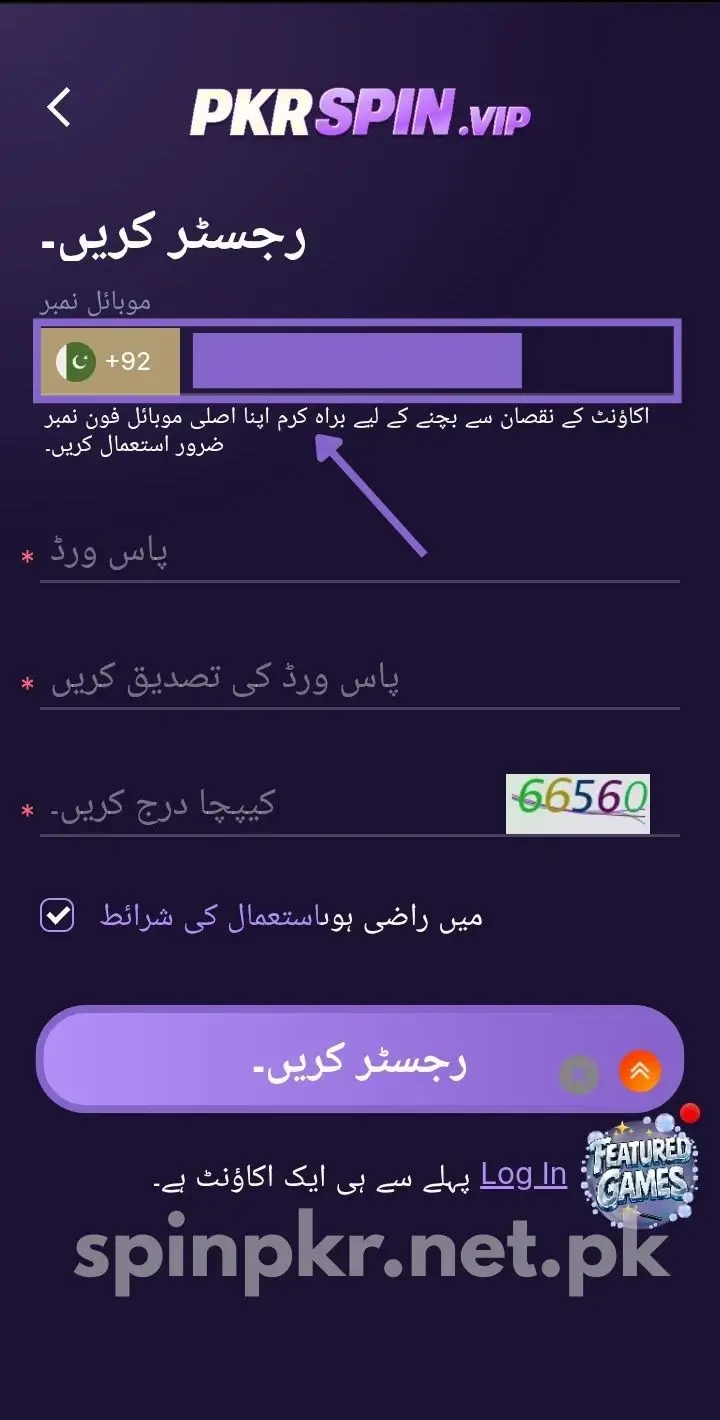
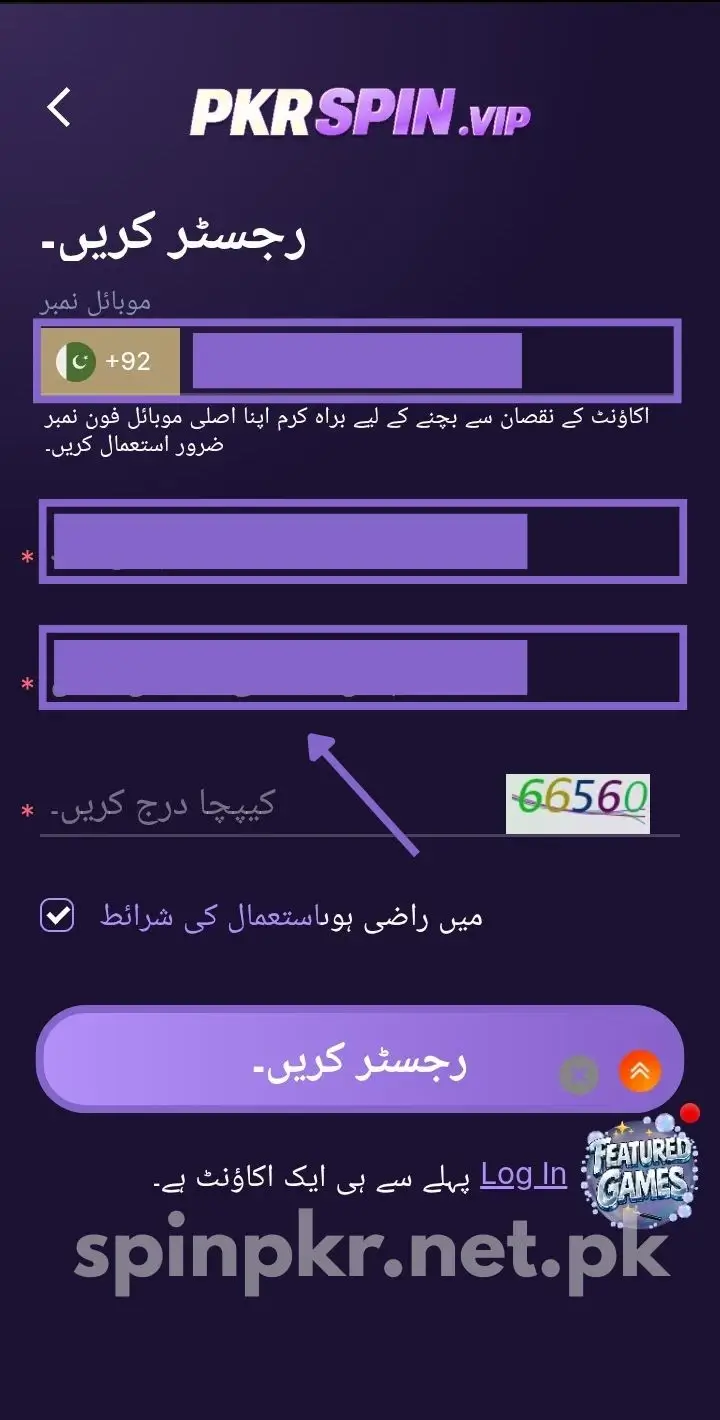
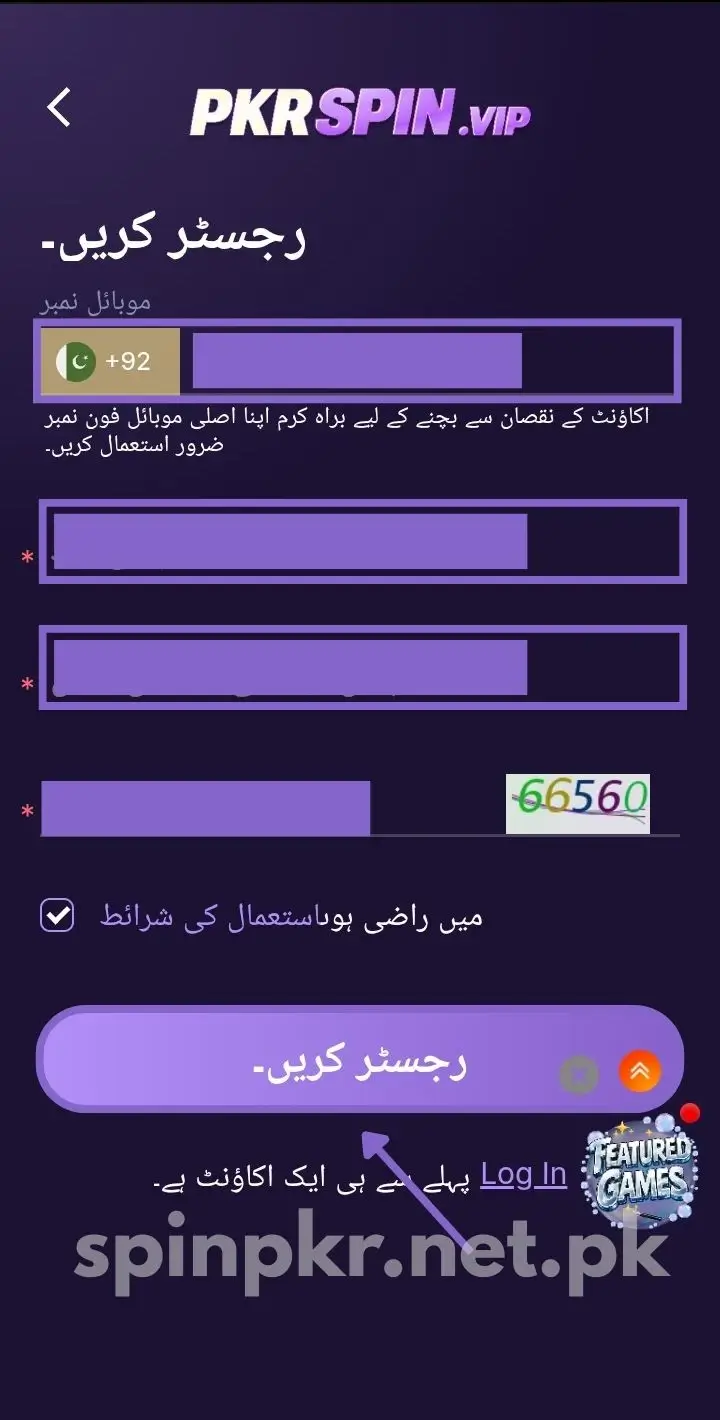
The whole thing takes about a minute:
- Open the SpinPkr app, or load the official site.
- Tap Register at the top right of the home screen.
- Enter your Pakistani mobile number with the +92 country code.
- Create a strong login password – 6 to 16 characters, mixing letters and numbers.
- Tap Get OTP and enter the 6-digit code sent to your number.
- Accept the terms and conditions, then tap Confirm.
- Your account is live and the Rs.6999 bonus loads automatically.
No app yet? Grab it first from the download page.
Set Your Transaction Password
Separate from your login password, this one is needed every time you withdraw. Set it right after registering:
- Go to your Profile and tap Security Settings.
- Select Transaction Password.
- Enter a 6-digit code you’ll remember, then confirm and save.
Never share it with anyone – not even support. The platform will never ask for it.
Link Your JazzCash or Easypaisa Wallet
You can’t withdraw without a linked wallet, so do this before your first deposit:
- Open your Profile and tap Bank Accounts or Wallet Settings.
- Select JazzCash or Easypaisa and enter your wallet number.
- Enter the account name exactly as it appears on your CNIC, then save.
Your wallet name must match your CNIC exactly, or withdrawals get blocked later. Prefer a bank? You can add HBL, Meezan Bank, or MCB in the same section. Once set, log in any time from the login page.
A Word on the Referral Code
If a friend gave you a code, pop it in the referral box while registering. It’s worth doing:
- Your friend earns a rebate when you make your first deposit.
- You may pick up a starter reward yourself.
- It only works during sign-up – you can’t add it later.
Once you’re in, you’ll get your own code to share and start earning too.
Welcome Bonus After Registration
Every new player gets a welcome bonus the moment they finish signing up – it lands in your balance automatically, no deposit needed:
- Use it on fishing games and slot games.
- Clear the wagering requirement before withdrawing any winnings from it (the bonus terms in the app spell it out).
- Log in on day two at 1 PM for the second-day bonus of up to PKR 88,888, based on your first-day deposit.
Registering From Abroad
SpinPkr is built for Pakistan, but overseas Pakistanis aren’t shut out:
- Register with a Pakistani mobile number that can receive SMS from Pakistan.
- The OTP must reach that number to verify your account.
- Overseas players can fund and cash out using USDT and crypto options.
Keeping Your Account Details Safe
Real money rides on this account, so set it up securely from day one:
- Pick a strong password – letters, numbers, and a symbol.
- Keep your login and transaction passwords different.
- Never share your password or OTP – not even with someone claiming to be support.
- Register only on the official app or site, never a lookalike.
Managing Your Account Later
Most details are easy to update once you’re registered:
- Change your password – do it anytime from your profile or settings.
- Change your mobile number – update it from the Personal Center in your profile, then verify the new number with an OTP.
- Delete your account – contact support to remove it; withdraw any balance first.
If Registration Won’t Go Through
Sign-up snags are usually small. Here’s how to clear them:
- OTP not received – wait 60 seconds and tap Resend. Check your number is active with signal, and switch from Wi-Fi to mobile data.
- “Number already registered” – an account already exists; log in instead, and reset the password if you forgot it.
- Registration page not loading – clear the app cache, then close and reopen the app; reinstall the APK if it persists.
- App crashing during sign-up – restart your phone, make sure you have 100 MB free, and try again.
- Still stuck? – reach the 24/7 in-app support chat for help.
Last Word
That’s all there is to it – your number, a password, one OTP, and you’re registered with your Rs.6999 bonus ready to go.
Just remember this is real money, so set a budget before you deposit. Ready? Create your account or, if you’re already in, log in here.
FAQs
Is registration on SpinPkr free?
Yes, completely free. There’s no fee to create an account – you only spend money if you choose to deposit and play.
How long does it take to register?
Under a minute. You just need your mobile number and a password to create an account and log in for the first time.
Can I register without a Pakistani number?
You need an active mobile number to verify by OTP. Overseas Pakistanis can register with their Pakistani SIM or contact support.
How many accounts can I create?
One per phone number and device. Multiple accounts from the same IP get flagged and banned.
What bonus do I get after registering?
A welcome bonus instantly, plus a second-day login bonus of up to PKR 88,888 if you deposit on day one.
Is my personal data safe after registration?
Yes. The platform uses SSL encryption to protect all your account data.
My OTP isn’t arriving – what do I do?
Wait 60 seconds and tap Resend. Check your number has signal and isn’t blocking messages, and switch to mobile data. If it still won’t come, contact support.
Can I change my password after registering?
Yes, anytime. Go to your profile or settings, choose change password, enter the old one, and set a new one.
Can I change my registered mobile number?
Yes – update it from the Personal Center in your profile, then verify the new number with an OTP.
Can I delete my account?
Yes. Contact support to have it permanently removed. Be sure to withdraw any remaining balance first.